Overview
The Functional_Fusion Framework is designed to bring contrast maps and preprocessed time series from different fMRI experiments into a common analysis space - flexibly and efficiently. The framework is especially designed to share and analyze datasets with many different task for individual subjects. Aggregating these fMRI datasets is a powerful way to build better and bigger models of brain function.
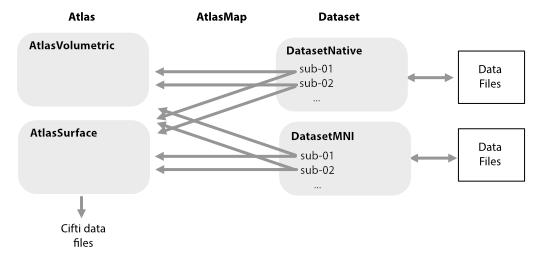
Each dataset may be stored in different locations and in different format. Each dataset is managed via a DataSet object that knows where to find the data and how to load it. This allows the user to interact with each dataset in a uniform way.
We provide a number of common DataSet classes that assume that the data is stored following a BIDS-derivative structure.
The analysis spaces (or regions of interest) are defined by an Atlas. While we have predefined some common Atlases or regions, you can define your own. The framework supports both Volume- and Surface-based atlases. The mapping between each Atlas and each subject in each dataset is determined by an AtlasMap, which allows you to extract the data from each subject without reslicing the images into a common space. This is especially useful if you want to get the time-series data for a specific region in the native space of the subject. Extracted data can be storted in CIFTI-files for further use, so you do not have to re-extract the data every time you want to use it.
There are three main steps to using this framework on new data:
Data Import: Bringing the data into the common framework. This includes the import of the preprocessed time series or the contrast (beta) estimates. The data files are stored in the
ffimportdirectory. A number of Datasets are already imported and can be downloaded freely.Data Extraction: Pull the data in a specific atlas space, defined by an
Atlas. The resulting CIFTI-file are by default stored in theffextractdirectory for each dataset for quick retrieval.Data Analysis: After the data is extracted, you can simply load the data from the
ffextractdirectory withdataset.get_data(). which gives you a(nsubj x nfeatures x voxel/vertices)tensor. You can then perform any analysis on this data. The repository provides a number of common analysis function for data aggregation and reliability estimation.